
wrap your hands around some asymmetrical
gameplay hi I’m Rebecca Brayton and
welcome to watchmojo.com and today we’re
speaking with the folks at Nintendo to
learn more about the we use unique
controller the gamepad the new Wii U
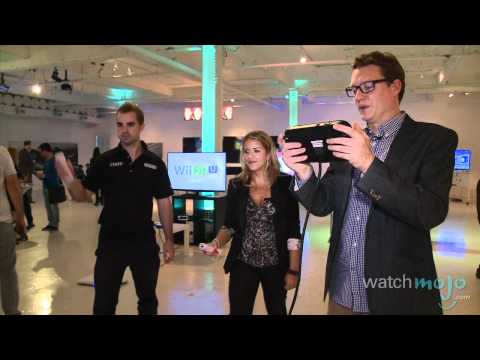
gamepad is the new controller that has a
touchscreen built into it it’s its own
screen where you can watch your games on
that screen it has tons of ways to
basically put you into the content
that’s happening in your video games in
ways that have never been done before I
can actually play using the Wii U
gamepad and add platforms in to help the
other players cuz every time I tap the
screen it gives them a platform so I can
work cooperatively with them or
competitively by disrupting them and
putting one in front of them which isn’t
really very nice so another great game
coming for Wii U is Pikmin 3 one of the
unique features using the gamepad is
that it’s actually your map so you can
actually see where you are in real time
and you can put this kind of rested by
the TV or close to you on the coffee
table so that it doesn’t disrupt your
game by having to exit the actual fun
that you’re having on the main screen to
look at your menu can you explain to us
what asymmetrical gameplay is
asymmetrical gameplay is what the Wii U
gamepad is all about it offers this
second layer of vision into the game
that’s happening on the screen and it
allows you to have a different
perspective
for the person that’s using the new Wii
U gamepad – what the perspective is for
the other players who are using the Wii
Remote Plus controllers or the other
accessories so this is one of the
Nintendo land attractions that really
shows off what asymmetric gameplay has
to offer and what this integrated second
screen on the Wii U gamepad has to offer
so I’m looking at this screen I actually
don’t even need to look at the TV so I
can just look here
and I’m controlling this character here
with the bow and arrow these two other
characters in the front are these two
using swords so you’re working together
cooperatively to get to the end of the
level but the experience that the person
using the sword versus the person using
the bow and arrow gets is totally
different it brings a lot of familiarity
there’s tons of buttons dual analog
control sticks that are clickable all of
those allow four different button
configurations and different types of
games for whatever the developer dreams
up it also becomes your TV remote you
can turn your TV on and off change
channels and there’s gonna be other
functionality available it becomes a
portable gaming device that still
resides within the same room as your
console because you can actually take
the content for some games off of the TV
screen and then play your game directly
on the screen of the Wii U gamepad
there’s motion controls built in there’s
a gyroscope built in so it’s super
technical with what it’s able to offer
and developers are gonna have a lot of
fun with it because of all these
different features that it has it’s got
a camera built into it and we’ve shown
that you can use it for video chat
between other Wii U consoles there’s a
microphone built-in which helps with
video chat there’s going to be tons of
creative ways that the camera and the
microphone get built into games and
there’s still more that we haven’t even
announced yet thank you very much thank
you
gameplay hi I’m Rebecca Brayton and
welcome to watchmojo.com and today we’re
speaking with the folks at Nintendo to
learn more about the we use unique
controller the gamepad the new Wii U
gamepad is the new controller that has a
touchscreen built into it it’s its own
screen where you can watch your games on
that screen it has tons of ways to
basically put you into the content
that’s happening in your video games in
ways that have never been done before I
can actually play using the Wii U
gamepad and add platforms in to help the
other players cuz every time I tap the
screen it gives them a platform so I can
work cooperatively with them or
competitively by disrupting them and
putting one in front of them which isn’t
really very nice so another great game
coming for Wii U is Pikmin 3 one of the
unique features using the gamepad is
that it’s actually your map so you can
actually see where you are in real time
and you can put this kind of rested by
the TV or close to you on the coffee
table so that it doesn’t disrupt your
game by having to exit the actual fun
that you’re having on the main screen to
look at your menu can you explain to us
what asymmetrical gameplay is
asymmetrical gameplay is what the Wii U
gamepad is all about it offers this
second layer of vision into the game
that’s happening on the screen and it
allows you to have a different
perspective
for the person that’s using the new Wii
U gamepad – what the perspective is for
the other players who are using the Wii
Remote Plus controllers or the other
accessories so this is one of the
Nintendo land attractions that really
shows off what asymmetric gameplay has
to offer and what this integrated second
screen on the Wii U gamepad has to offer
so I’m looking at this screen I actually
don’t even need to look at the TV so I
can just look here
and I’m controlling this character here
with the bow and arrow these two other
characters in the front are these two
using swords so you’re working together
cooperatively to get to the end of the
level but the experience that the person
using the sword versus the person using
the bow and arrow gets is totally
different it brings a lot of familiarity
there’s tons of buttons dual analog
control sticks that are clickable all of
those allow four different button
configurations and different types of
games for whatever the developer dreams
up it also becomes your TV remote you
can turn your TV on and off change
channels and there’s gonna be other
functionality available it becomes a
portable gaming device that still
resides within the same room as your
console because you can actually take
the content for some games off of the TV
screen and then play your game directly
on the screen of the Wii U gamepad
there’s motion controls built in there’s
a gyroscope built in so it’s super
technical with what it’s able to offer
and developers are gonna have a lot of
fun with it because of all these
different features that it has it’s got
a camera built into it and we’ve shown
that you can use it for video chat
between other Wii U consoles there’s a
microphone built-in which helps with
video chat there’s going to be tons of
creative ways that the camera and the
microphone get built into games and
there’s still more that we haven’t even
announced yet thank you very much thank
you
Please follow and like us: